Kwikset Touchscreen and Keyless Door Locks: Technical Spec Breakdown
Selecting a dependable kwikset touchscreen entry door lock requires evaluating how electronic deadbolts balance motorized physical latching, digital interface durability, and wireless network protocols. Touchscreen and keypad locks replace standard mechanical cylinders with electronic access control, allowing homeowners to manage credentials without physical keys. Kwikset designs these deadbolts across distinct operational tiers, separating standalone offline…

As Amazon Associates, we earn from qualifying purchases. This means we may receive a small commission at no extra cost to you if you click through and make a purchase.
Selecting a dependable kwikset touchscreen entry door lock requires evaluating how electronic deadbolts balance motorized physical latching, digital interface durability, and wireless network protocols. Touchscreen and keypad locks replace standard mechanical cylinders with electronic access control, allowing homeowners to manage credentials without physical keys. Kwikset designs these deadbolts across distinct operational tiers, separating standalone offline units from locks that communicate over residential Wi-Fi networks or dedicated Z-Wave smart home mesh systems. Determining the ideal electronic deadbolt depends on whether you require remote guest credential provisioning, automated geofenced entry, or an isolated offline locking mechanism that minimizes power consumption.
This technical evaluation covers six distinct Kwikset electronic deadbolt models to deliver a thorough kwikset door lock comparison. Across these devices, mechanical and electronic architecture varies significantly. The comparison analyzes the Kwikset Halo Wi-Fi Smart Lock with direct network onboarding, the SmartCode 270 and SmartCode 260 featuring BHMA Grade 2 certified chassis, the compact Powerbolt 250 standalone keypad, and the HomeConnect 918 and HomeConnect 620 deadbolts powered by Z-Wave 700 Long Range technology. These models diverge across key technical specifications, including capacitive touchscreen versus tactile pushbutton entry, access code capacity ranging from 25 to 250 credentials, and varying backset and door thickness tolerances.
Which Kwikset Touchscreen Door Locks Should You Buy
- Choose the Kwikset Halo Wi-Fi Smart Lock if you want direct smartphone app control, geofenced auto-unlock, and remote credential distribution without an external smart hub.
- Choose the Kwikset SmartCode 270 Keyless Entry Electronic if you prefer a sleek standalone capacitive touchpad with BHMA Grade 2 security and up to 50 user codes.
- Choose the Kwikset Powerbolt 250 10-Button Keypad Matte if you need a straightforward, budget-conscious offline keypad deadbolt for side doors, garage entries, or rental storage.
- Choose the Kwikset HomeConnect 918 Contemporary Z-Wave Long if you run a Ring Alarm or SmartThings hub and require contemporary touchscreen styling with Z-Wave 700 Long Range coverage.
- Choose the Kwikset HomeConnect 620 Z-Wave Long Range if you want deep integration with Ring Alarm or SmartThings systems paired with traditional physical pushbutton tactile feedback.
- Choose the Kwikset SmartCode 260 Keyless Entry Electronic if you need Grade 2 physical protection, SmartKey re-keying, and tactile backlit buttons for high-traffic front entrances without network exposure.
Kwikset Halo Wi-Fi Smart Lock

Buyer favouriteScored 9.4/10 or higher
Price not listed
Our score: 9.4/10Overwhelmingly positive
Brand Kwikset ASIN B081FXQH96
Best for: Hub-free remote Wi-Fi access control
Pros
- Direct Wi-Fi connection
- 250 user codes
- Grade AAA certified
Cons
- Higher wireless power draw
- Batteries not included
The Kwikset Halo Wi-Fi Smart Lock is designed for property owners who demand autonomous network connectivity without investing in auxiliary smart bridge hardware. By integrating a Wi-Fi radio directly inside the interior deadbolt assembly, the unit connects straight to your home network. Homeowners use the Kwikset app to remotely lock or unlock the door, inspect real-time activity logs, and configure access privileges from any location. The lock also supports intelligent geofencing to trigger automatic unlocking on approach, as well as voice control routines through Amazon Alexa and Google Home.
Credential architecture on the Halo is expansive, supporting up to 250 individual access codes that can be scheduled, designated for temporary guest use, or stored as permanent access profiles. Physical security is rated at Grade AAA certification by the BHMA alongside UL listing credentials, ensuring the deadbolt provides high-level resistance against forced entry and environmental degradation. The exterior escutcheon incorporates a backlit touchscreen interface alongside an integrated intrusion detection sensor that issues instantaneous mobile notifications if someone tampers with the lock or submits repeated invalid code entries.
Mechanical installation uses a standard screwdriver and accommodates standard residential entry prep, fitting doors between 1-3/8 inches and 1-3/4 inches thick with an adjustable deadbolt backset of 2-1/8 inches to 2-3/4 inches. The hardware package carries a lifetime mechanical and finish warranty alongside a 1-year electronics warranty. Property owners evaluating a connected kwikset keyless entry door lock smart solution will find the Halo optimal for comprehensive mobile management, though users who prefer to avoid cloud dependencies or app setups will prefer Kwikset’s standalone SmartCode or Z-Wave models.
- Built-in Wi-Fi radio for remote Kwikset app operation without a separate smart home bridge
- Grade AAA certified deadbolt with UL listing for verified residential security
- High-capacity code memory accommodating up to 250 customizable guest credentials
- Integrated intrusion detection sensors providing instant alerts for tampering or invalid entries
Kwikset SmartCode 270 Keyless Entry Electronic

Price not listed
Our score: 8.2/10Mostly positive
Brand Kwikset ASIN B0CC6JFS4C
Best for: Offline Grade 2 touchpad security
Pros
- BHMA Grade 2 certified
- 50 custom user codes
- 12-month battery life
Cons
- No wireless app connectivity
- Batteries not included
The Kwikset SmartCode 270 Keyless Entry Electronic serves users who prioritize modern touchscreen aesthetics without the ongoing network management or battery drain of wireless radios. This standalone unit relies on a 10-button light-up touchpad that illuminates upon contact, providing rapid access in low-light conditions. Because all credential processing occurs locally on the internal circuit board, users do not have to worry about Wi-Fi dropouts, hub pairing sequences, or network firmware updates when operating their entry door.
Security engineering is a core highlight of the SmartCode 270, which achieves BHMA Grade 2 certification across security, durability, and finish standards. Kwikset notes this rating is up to 2.5 times stronger than standard Grade 3 certified lock sets. The unit accommodates 50 customizable user codes, 10 single-use temporary codes, and a master programming code that prevents unauthorized credential modifications. For extended departures, activating Vacation Mode completely shuts off the exterior touchpad, disabling digital entry until manually reactivated. Built-in intrusion safeguards sound an audible alarm and trigger a 60-second keypad lockout after three consecutive incorrect entries.
Power management is highly efficient, delivering at least 12 months of operational lifespan from four AA alkaline batteries. Installation requires only a screwdriver, supported by the BILT application which provides interactive 3D voice, text, and animated guidance. Pairing this deadbolt with a matching kwikset deadbolt and door knob set ensures consistent entry door aesthetics. While the SmartCode 270 provides dependable, local touchpad operation, property owners requiring smart home automation or remote access status checks should look toward the HomeConnect or Halo lines.
- BHMA Grade 2 certified build offering up to 2.5 times the strength of Grade 3 deadbolts
- Capacitive light-up touchpad memory storing 50 persistent codes and 10 one-time access codes
- Configurable auto-lock timers with intervals of 30 seconds, 1 minute, 3 minutes, 5 minutes, or 10 minutes
- Vacation Mode security feature that disables touchpad input entirely during travel
Kwikset Powerbolt 250 10-Button Keypad Matte

Buyer favouriteScored 9.4/10 or higher
Price not listed
Our score: 9.6/10Overwhelmingly positive
Brand Kwikset ASIN B0C7LPRYJB
Best for: Side doors and garage entries
Pros
- Tactile 10-button keypad
- SmartKey re-key cylinder
- Illuminated nighttime LEDs
Cons
- Limited to 25 user codes
- Batteries not included
The Kwikset Powerbolt 250 10-Button Keypad Matte is an electronic deadbolt engineered for straightforward access control on entry doors, side doors, garage entries, and residential storage units. Built with a transitional matte black aesthetic, it features a physical 10-button keypad illuminated by bright LED backlighting. Tapping the keypad instantly illuminates the numbers for nighttime code entry, offering distinct tactile response with each button press that some users prefer over smooth touchscreens.
Credential configuration on the Powerbolt 250 includes support for up to 25 persistent user codes, 5 single-use temporary codes, and a master programming code. Security features match higher-tier models, incorporating an intrusion alert that sounds an audible alarm and locks out keypad inputs for one minute following three consecutive invalid code entries. The lock also includes Kwikset’s Vacation Mode, which deactivates the exterior keypad while residents are away, ensuring only the physical mechanical key can operate the deadbolt.
The mechanical cylinder incorporates SmartKey Security, enabling homeowners to re-key the lock cylinder in seconds to any standard KW1 key without removing the deadbolt from the door. Operating on four AA alkaline batteries, the Powerbolt 250 achieves up to 12 months of battery life. Installation is handled with a simple screwdriver using the included mounting hardware, latch, and strike plate. While its 25-code capacity and offline design are ideal for residential side entries and utility doors, buyers needing remote management or larger code directories will find the SmartCode 270 or HomeConnect 918 better suited to high-volume access requirements.
- Tactile 10-button illuminated keypad providing reliable low-light visibility and positive click feedback
- SmartKey Security cylinder enabling quick re-keying to any KW1 key profile
- Memory bank supporting 25 user access codes and 5 dedicated one-time guest credentials
- Automatic locking profiles with selectable intervals from 30 seconds up to 10 minutes
Kwikset HomeConnect 918 Contemporary Z-Wave Long

Price not listed
Our score: 9.0/10Very positive
Brand Kwikset ASIN B0DTBJJ8KR
Best for: Ring Alarm touchscreen integration
Pros
- Z-Wave 700 Long Range
- S2 encryption standard
- Batteries included
Cons
- Requires separate Z-Wave hub
- Listing omits BHMA grade
The Kwikset HomeConnect 918 Contemporary Z-Wave Long is built specifically for users managing an integrated smart home ecosystem through a dedicated Z-Wave controller. Outfitted with the advanced Z-Wave 700 Long Range radio, this deadbolt communicates over extensive distances, providing reliable direct connectivity to compatible hubs even across large properties or detached outbuildings. It incorporates industry-standard S2 security encryption to safeguard RF transmissions against interception and hacking, alongside SmartStart technology for frictionless QR-code onboarding.
Engineered for deep ecosystem interoperability, the HomeConnect 918 interfaces directly with systems like Ring Alarm and Samsung SmartThings. Users can lock, unlock, check deadbolt status, and manage access schedules directly within their security provider’s application. The contemporary exterior escutcheon features a responsive, clean touchscreen interface that stores up to 250 unique user access codes alongside a master programming code. The lock also offers customizable auto-lock timing routines, selectable across 30-second, 1-minute, 3-minute, 5-minute, and 10-minute delays.
From a hardware perspective, the deadbolt fits standard door thicknesses between 1-3/8 inches and 2 inches, offering an adjustable backset from 2-3/8 inches to 2-3/4 inches. Unlike many electronic deadbolts that ship without cells, the 918 includes four AA alkaline batteries out of the box, delivering an estimated 12-month operational lifespan. When paired with a complementary kwikset door handle exterior, this contemporary unit elevates modern front entryways. It represents the pinnacle of connected Kwikset touchscreen deadbolts, though it strictly requires an external Z-Wave smart hub to utilize its wireless functionality.
- Z-Wave 700 Long Range wireless technology with S2 data encryption and SmartStart QR commissioning
- Native smart home integration with Ring Alarm and Samsung SmartThings security hubs
- Full-featured capacitive touchscreen supporting up to 250 customizable user access codes
- Extended door thickness compatibility accommodating residential doors up to 2 inches thick
Kwikset HomeConnect 620 Z-Wave Long Range
Price not listed
Our score: 8.2/10Mostly positive
Brand Kwikset ASIN B0DWGXFS8H Prime eligible
Best for: Z-Wave smart homes wanting tactile buttons
Pros
- Extended Z-Wave range
- Physical 10-button keypad
- Ring and SmartThings compatible
Cons
- Requires compatible Z-Wave hub
- Listing omits BHMA grade
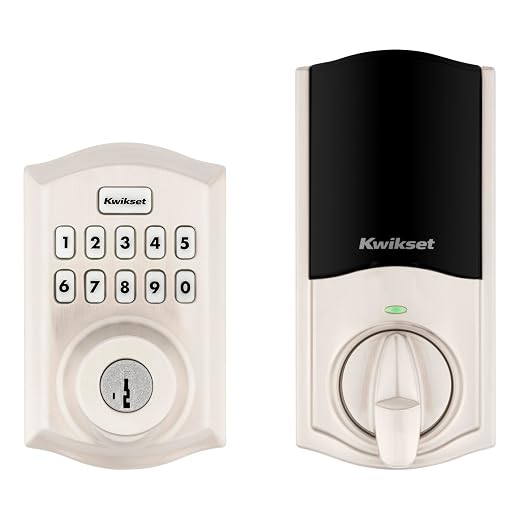
The Kwikset HomeConnect 620 Z-Wave Long Range provides the identical RF intelligence and smart ecosystem interoperability of the 918, but wraps it in a traditional design featuring a physical 10-button keypad. Powered by a Z-Wave 700 Long Range chipset, the lock establishes an extended-range link directly to your central smart home controller. The inclusion of S2 encryption guarantees encrypted communication channels, while SmartStart simplifies pairing by scanning the lock’s pairing code through your hub’s companion application.
This deadbolt is fully compatible with Ring Alarm and Samsung SmartThings networks, allowing automated arming and disarming sequences when credentials are authenticated at the door. The internal memory stores up to 250 individual user codes and 1 programming code, enabling detailed access delegation for household members, contractors, and recurring service providers. Customizable auto-lock settings let users configure the latch to extend automatically at 30 seconds, 1 minute, 3 minutes, 5 minutes, or 10 minutes following entry or exit.
The HomeConnect 620 is supplied in a traditional Satin Nickel finish with four AA alkaline batteries included, providing approximately 12 months of routine operation. The mechanical assembly fits standard exterior and interior doors between 1-3/8 inches and 2 inches thick, with an adjustable deadbolt backset spanning 2-3/8 inches to 2-3/4 inches. For homeowners who demand the wireless capabilities of a connected deadbolt but prefer the tactile reassurance of physical mechanical push buttons over a glass touchscreen, this model is the optimal choice.
- Z-Wave 700 Long Range architecture delivering extended signal penetration to centralized hubs
- Certified compatibility with Ring Alarm and Samsung SmartThings platforms
- Tactile 10-button keypad suitable for all-weather exterior applications and glove operation
- Supplied with four AA batteries delivering up to 12 months of operational battery life
Kwikset SmartCode 260 Keyless Entry Electronic
Buyer favouriteScored 9.4/10 or higher
Price not listed
Our score: 9.8/10Overwhelmingly positive
Brand Kwikset ASIN B0BBJQKV5K
Best for: High-traffic offline doors needing Grade 2
Pros
- BHMA Grade 2 certified
- Microban protected keypad
- SmartKey re-keying tool included
Cons
- No smart hub connectivity
- Batteries not included
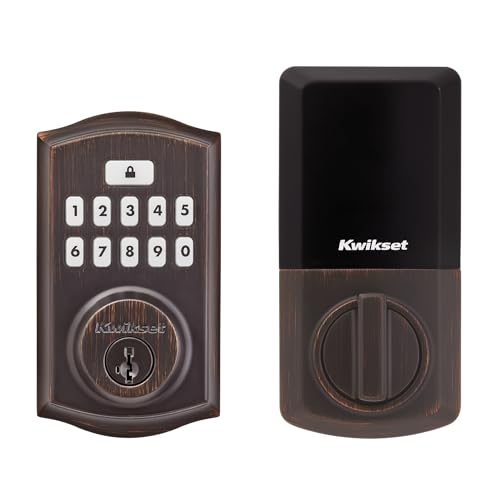
The Kwikset SmartCode 260 Keyless Entry Electronic deadbolt combines certified mechanical durability with a tactile push-button interface for homeowners seeking dependable, offline keyless convenience. Encased in a traditional Venetian Bronze housing, the lock features a 10-button backlit keypad treated with Microban antimicrobial protection to inhibit bacterial growth on high-touch surfaces. Like the 270, this unit requires no wireless connections, making it immune to network drops or cyber interference.
Mechanical resilience is backed by a BHMA Grade 2 certification across security, durability, and finish standards, delivering 2.5 times the strength of standard Grade 3 entry hardware. The electronic controller supports 50 persistent user codes, 10 one-time entry codes, and a master programming code for secure on-device administration. Protection features include an automated intrusion alert that activates an audible alarm and locks down the keypad for 60 seconds after three incorrect code entries, along with an integrated Vacation Mode that disables the digital interface completely.
The deadbolt integrates Kwikset SmartKey Re-Key technology, enabling users to re-key the physical lock cylinder to an existing KW1 key in seconds using the included SmartKey learn tool. It operates on four AA alkaline batteries for roughly 12 months and installs quickly using a screwdriver and the BILT 3D interactive application. When matched with a coordinated kwikset door handle, the 260 offers robust front-door protection. It bridges the gap between basic utility locks like the Powerbolt 250 and high-tech touchscreen deadbolts, offering Grade 2 peace of mind with traditional physical buttons.
- BHMA Grade 2 certified physical construction offering verified resistance against forced entry
- 10-button backlit push-button keypad featuring Microban antimicrobial surface protection
- SmartKey Security cylinder with included learn tool for fast mechanical key re-keying
- Local memory supporting 50 persistent codes, 10 temporary codes, and 1 programming code
What Sets These Models Apart
| Model | Wireless Protocol | Interface Style | User Code Capacity | Security Certification |
|---|---|---|---|---|
| Kwikset Halo Wi-Fi Smart Lock | Direct Wi-Fi 2.4 GHz (No Hub) | Capacitive Touchscreen | 250 User Codes | BHMA Grade AAA Certified, UL Listed |
| Kwikset SmartCode 270 Keyless Entry Electronic | Standalone (Non-Connected) | Light-Up Touchpad | 50 Codes + 10 One-Time Codes | BHMA Grade 2 Certified |
| Kwikset Powerbolt 250 10-Button Keypad Matte | Standalone (Non-Connected) | Tactile 10-Button Keypad | 25 Codes + 5 One-Time Codes | The listing does not specify |
| Kwikset HomeConnect 918 Contemporary Z-Wave Long | Z-Wave 700 Long Range (Hub Required) | Capacitive Touchscreen | 250 User Codes | The listing does not specify |
| Kwikset HomeConnect 620 Z-Wave Long Range | Z-Wave 700 Long Range (Hub Required) | Tactile 10-Button Keypad | 250 User Codes | The listing does not specify |
| Kwikset SmartCode 260 Keyless Entry Electronic | Standalone (Non-Connected) | Tactile 10-Button Keypad | 50 Codes + 10 One-Time Codes | BHMA Grade 2 Certified |
Buying Tips for Kwikset Touchscreen Door Locks
Selecting the right Kwikset electronic deadbolt begins with defining your network architecture and smart home connectivity expectations. If your objective is remote unlocking, real-time activity tracking, and mobile code distribution without additional hardware, a Wi-Fi-enabled lock like the Halo is the most straightforward option. However, if your home already utilizes an automation hub such as Ring Alarm or Samsung SmartThings, opting for a kwikset z-wave door lock like the HomeConnect 918 or 620 provides superior battery conservation, S2 military-grade transmission encryption, and local mesh communication that remains functional even when residential internet service goes offline.
The physical input interface represents another essential hardware choice between smooth capacitive touchscreens and raised tactile pushbuttons. Touchscreen models, such as the SmartCode 270 and HomeConnect 918, offer sleek, flush-mounted aesthetics and eliminate physical button wear, which prevents observers from guessing digits based on worn surface textures. Conversely, physical 10-button keypads found on the Powerbolt 250, HomeConnect 620, and SmartCode 260 provide positive mechanical travel and tactile feedback. Tactile buttons are frequently easier to operate in low-visibility environments, during freezing weather, or when entering code combinations while wearing gloves.
Finally, inspect physical door geometry and security ratings prior to purchase. Ensure your door’s thickness aligns with the hardware specs, as standalone models typically support up to 1-3/4 inches while HomeConnect models accommodate thicker doors up to 2 inches. Verify your backset dimension, adjusting the deadbolt latch between 2-3/8 inches and 2-3/4 inches (or 2-1/8 inches on the Halo) so the motorized bolt extends smoothly into the door jamb strike plate without binding.